
Brand templates
Use reusable templates and brand assets to keep campaign creative aligned.
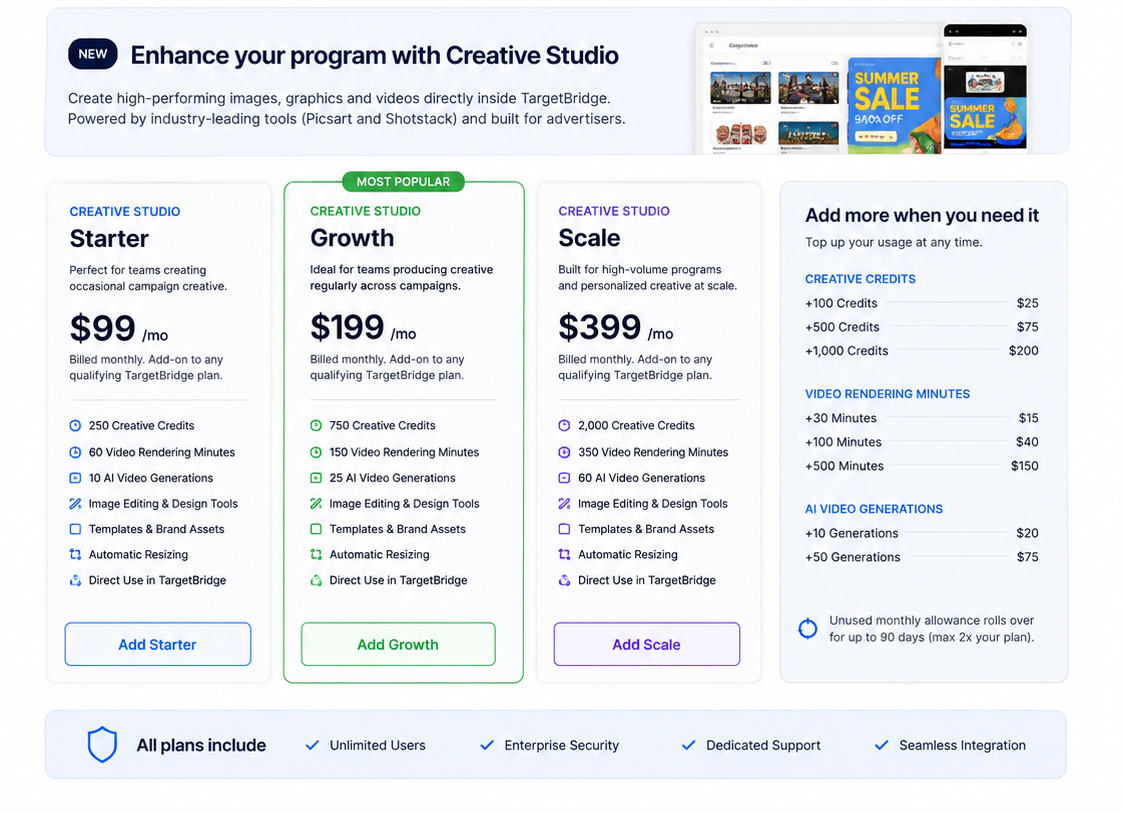
Create and adapt images, graphics, and video for TargetBridge advertising workflows, with templates, brand assets, resizing, and creative variations available in the same campaign environment.
Use reusable templates and brand assets to keep campaign creative aligned.
Create and adapt graphics in the same environment where campaigns are planned.
Prepare variations for different placements and campaign surfaces.
Create video assets for supported campaign workflows.
Explore versions for message, layout, audience, and placement needs.
Use campaign assets directly in supported TargetBridge advertising workflows.
Creative Studio supports the execution layer by helping teams produce, adapt, and use assets in the same TargetBridge workflows that turn account priority into action.
Confirm the asset types, workflows, and campaign surfaces your team needs.